From Manual Deployments to CI/CD: Automating a Node.js App with GitHub Actions
From Manual Deployments to CI/CD: Automating a Node.js App with GitHub Actions
Every developer runs into this at some point.
You make a small change, push your code, and then you have to log into your server, pull the latest changes, rebuild the app, and restart it. It feels manageable at first, but after doing it a few times, it starts to feel repetitive and fragile.
That was exactly my situation. Things worked, but the process depended too much on me remembering every step.
So I decided to automate it.
This post walks through how I moved from manual deployments to a simple CI/CD pipeline using GitHub Actions, Docker, and a basic Node.js app.
The Problem with Manual Deployment
Here's what my deployment process looked like:
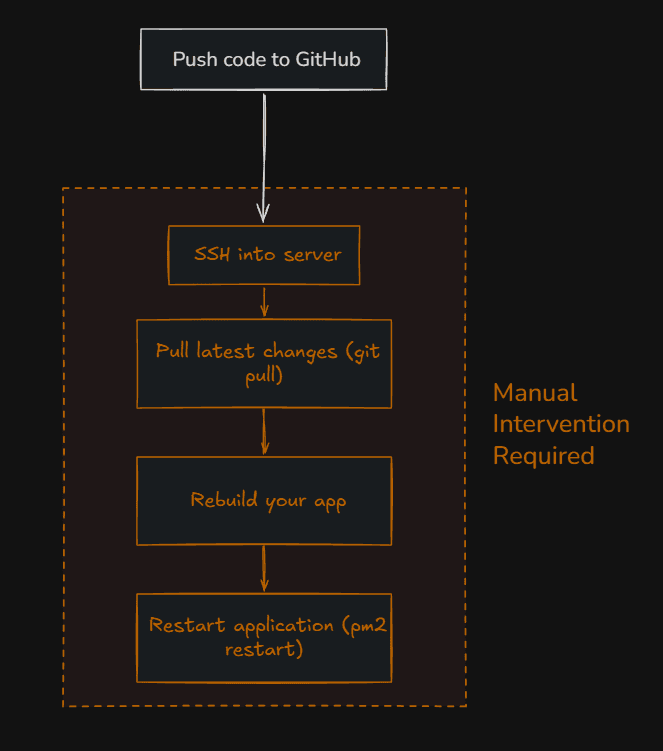
git push origin main

ssh user@server

cd Nodejs-app
git pull origin main
docker compose up -d --build
It does the job, but there are a few issues:
- You have to repeat the same steps every time.
- It is easy to forget something.
- It does not scale well.
- Mistakes can break your running app.
At one point, I forgot to rebuild the container after pulling changes, and I was confused why nothing updated. That kind of issue is small but annoying.
A Better Approach
Instead of doing all of that manually, I wanted a system where pushing code would automatically trigger deployment.
That's where CI/CD comes in.
In simple terms:
- Continuous Integration means your code changes are automatically processed when you push them.
- Continuous Deployment means those changes are automatically deployed.
No complicated definitions needed. The goal is simple: remove manual work.
Why Set Up CI/CD
After setting it up, a few benefits became obvious:
- No need to log into the server for every update.
- Faster and more consistent deployments.
- Less room for human error.
- A workflow that matches real production environments.
It also makes your projects feel more complete and professional.
What We Are Building
The setup is straightforward.
Whenever code is pushed to the main branch:
- The server pulls the latest code.
- Docker rebuilds the application.
- The container restarts automatically.
Step 1: The Node.js App
Here's the simple Express server used:
import express from "express"

const app = express()
const PORT = process.env.PORT ?? 8080

app.get("/", (req, res) => {
  return res.json({ msg: "Hello from the server v2" })
})

app.listen(PORT, () => {
  console.log(`Server is running on port ${PORT}`)
})
Nothing complex here. Just a basic endpoint to verify deployment changes.
Step 2: Docker Setup
Dockerfile
FROM node:22-alpine

WORKDIR /app

COPY package*.json ./
RUN npm install

COPY . .

EXPOSE 8080

CMD ["node", "index"]
This defines how the app is built and run inside a container.
Step 3: Docker Compose
services:
  app:
    build:
      context: .
      dockerfile: Dockerfile
    restart: unless-stopped
    ports:
      - "8080:8080"
With this, the app can be started using a single command.
Even at this stage, deployment is easier, but still manual.
Step 4: Two Deployment Approaches
In this case, I used my home server as a self-hosted runner. But you can also use GitHub's hosted runners with SSH to deploy to any remote server.
Option 1: Self-Hosted Runner (My Home Server)
.github/workflows/deploy-selfhosted.yml
name: Deploy NodeJS App Locally

on:
  push:
    branches:
      - main

jobs:
  deploy:
    runs-on: self-hosted  # Runs on your own server

    steps:
      - name: Checkout Code
        uses: actions/checkout@v4

      - name: Build & Run Docker
        run: |
          cd /home/sandesh/Nodejs-app
docker compose up -d --buildPros: Runs directly on your server, no network latency.
Cons: Server must be online and configured as GitHub runner.
Option 2: GitHub Hosted Runner + SSH (Remote Server)
.github/workflows/deploy-ssh.yml
name: Deploy NodeJS App via SSH

on:
  push:
    branches:
      - main

jobs:
  deploy:
    runs-on: ubuntu-latest  # GitHub's hosted runner

    steps:
      - name: Checkout Code
        uses: actions/checkout@v4

      - name: Deploy via SSH
        uses: appleboy/ssh-action@v1.0.3
        with:
          host: ${{ secrets.SSH_HOST }}
          key: ${{ secrets.SSH_KEY }}
          script: |
            cd /root/nodejs-application-deploy-github-actions
            git pull
            docker compose up -d --build
Setup required:
- Add
SSH_HOSTandSSH_KEYas GitHub repository secrets. - Generate SSH key pair and add public key to your server's
~/.ssh/authorized_keys.
Pros: Works with any remote server (VPS, cloud, etc.). Cons: Requires SSH key setup and network transfer.
Trying It Out
Once everything is set up, deployment becomes simple:
git add .
git commit -m "Update CI/CD workflow"
git push origin main
After pushing:
- Workflow triggers automatically
- Server updates without manual login
- App rebuilds and restarts
Before and After
| Without CI/CD | With CI/CD |
|---|---|
| Manual SSH login required | Fully automated |
| Repeated commands | Single git push |
| Easy to forget steps | Consistent process |
| Slow, error-prone | Fast, reliable |
A Simple Test
Change the API response:
res.json({ msg: "Hello from the server v3 🚀" })Push and watch it deploy live. No server login needed.
Final Thoughts
Setting this up took ~30 minutes (mostly SSH key setup), but the payoff is immediate.
Deployment went from 5 manual steps to 1 git push.
Both approaches work great:
- Self-hosted for local/home servers
- SSH for remote VPS/cloud deployments
Pick what fits your setup. This is production-ready CI/CD that scales with your projects.
Ready to automate? Start with whichever server you have access to.